
Get Started with Azure Accounts
To create and use Azure services, you need an Azure subscription. When working with your own applications and business needs, you must create an Azure account, and a subscription will automatically be created for you.
Once your Azure account is created, you are free to create additional subscriptions. For example, your company might use a single Azure account for all its operations but create separate subscriptions for the development, marketing, and sales departments.
After creating an Azure subscription, you can start creating Azure resources within each subscription.
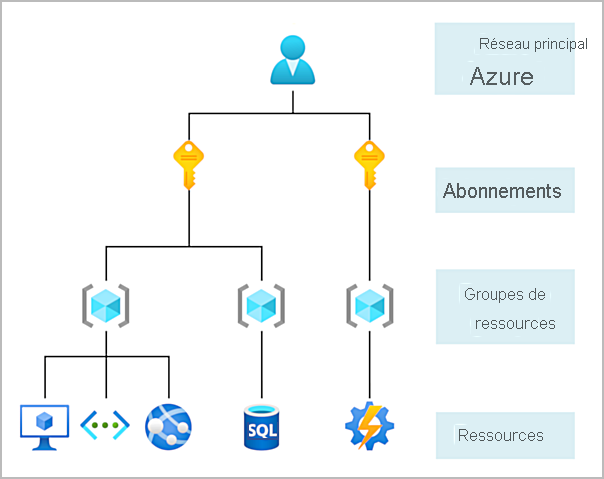
Get Started with Azure Accounts
If you are new to Azure, you can create a free account on the Azure website to start exploring the platform at no cost. When you’re ready, you can choose to upgrade your free account. You can also create a new subscription that allows you to start paying for the Azure services you need beyond the free account limits.
Create an Azure Account
You can purchase access to Azure directly from Microsoft by signing up on the Azure website or through a Microsoft representative.
You can also purchase access to Azure through a Microsoft partner. Partners in the Cloud Solution Provider (CSP) program offer a full range of managed cloud solutions for Azure.
What is the Free Azure Account?
The free Azure account includes:
- Free access to popular Azure products for 12 months
- A credit to use during the first 30 days
- Access to more than 25 products that are always free
The free Azure account is a great way for new users to start and explore the platform.
To sign up, you need a phone number, a credit card, and a Microsoft or GitHub account.
Credit card information is used only to verify your identity. You will not be charged unless you upgrade to a paid subscription.
What is the Free Azure Student Account?
The free Azure student account offer includes:
- Free access to certain Azure services for 12 months
- A credit to use during the first 12 months
- Free access to certain software development tools
The free Azure student account provides $100 in credit and free development tools.
Additionally, no credit card is required to sign up.
About Exercises in Azure Modules
Most exercises in the Introduction to Azure learning paths and modules require you to use your own subscription (BYOS – Bring Your Own Subscription).
This means you must have a subscription to complete the exercises.
Each exercise includes a cleanup step at the end.
It is important to complete this step to avoid unexpected Azure costs.
