
New Recipient
Location
Home Page > Transfer Icon > (+) icon
1) Context & Objective
Screen name: New Recipient
Purpose: Collect minimal information (name + number) to create an ad-hoc recipient and proceed with a transfer without saving them to contacts.
Expected result: The user enters a name and a number, the app validates and auto-fills the country code (+225), checks if an account exists (IretiPay in this example), then moves to the next transfer step (amount, summary, etc.).
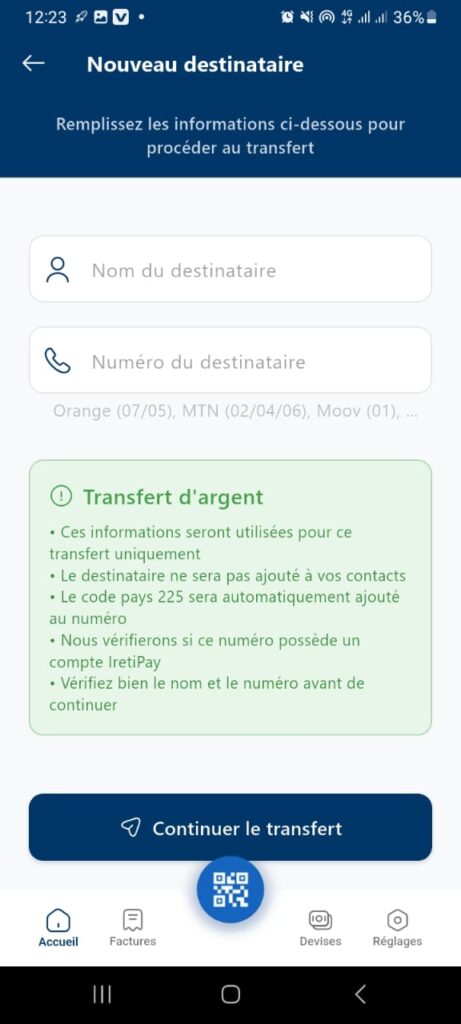
2) Structure & Content
Header
- Back button (arrow) → returns to previous screen (e.g., list of beneficiaries/transfer).
- Title: New Recipient.
- Subtitle: Fill in the information below to proceed with the transfer (helper text).
Form
- Recipient Name (text field)
- Person icon.
- Explicit placeholders, free format but basic controls.
- Recipient Number (numeric field)
- Phone icon.
- Operator info in contextual help: Orange (07/05), MTN (02/04/06), Moov (01)…
- Country code +225 added automatically.
Information Box (green)
- Title: Money Transfer.
- Key points:
- This information will be used for this transfer only.
- The recipient will not be added to your contacts.
- Country code +225 will be automatically added to the number.
- Check if the number has an IretiPay account.
- Verify name and number before continuing.
Primary CTA
- Button: Continue Transfer (blue).
- State: disabled until the form is valid.
Navigation (bottom bar)
Home, Bills, Currencies, Settings.
Floating QR button (blue) → quick entry via scan (optional for this flow).
3) Functional Rules
Name Field
- Mandatory.
- Length: 2–50 characters.
- Allowed: letters (including accents), spaces, hyphens, apostrophes.
- Forbidden: digits only, emojis, control characters.
Number Field
- Mandatory.
- Prefix +225 (Côte d’Ivoire) added automatically if missing.
- Format E.164: +225XXXXXXXXXX (10 digits after country code).
- Optional operator pre-validation:
- Orange: 07 + 8 digits
- MTN: 05 + 8 digits
- Moov: 01 + 8 digits
(Adapt according to latest nomenclature.)
Validation & States
- Continue button activates only if name and number are valid.
- On submission:
- Check if recipient account exists (IretiPay).
- If exists → go to amount screen.
- If not → suggest transfer via mobile money (depending on operator).
Contacts
- This recipient is not saved in contacts (one-time use).
Error Handling
- Invalid number: Invalid number. Check country code and length.
- Invalid name: Incomplete name.
- Account not found: This number is not registered. Do you want to continue via mobile money?
4) UX & Accessibility
- Numeric keyboard enforced on number field.
- Mask/formatting: display +225 as non-editable prefix, field for 10 digits.
- Auto-spacing / anti-paste: filter non-numeric characters, ignore spaces.
- Labels and help text readable, WCAG AA contrast.
Screen readers:
- Name field: “Recipient name, required”.
- Number field: “Recipient number, country code +225 added automatically”.
- Info box: “Information: Money Transfer. …”
- Button: “Continue Transfer, disabled/enabled”.
- Errors: text + red border + ARIA description.
Error prevention: confirm number on next screen (summary).
