
Version 3 of the Ireti App
Find an IretiPay Agent
1. Page Objective
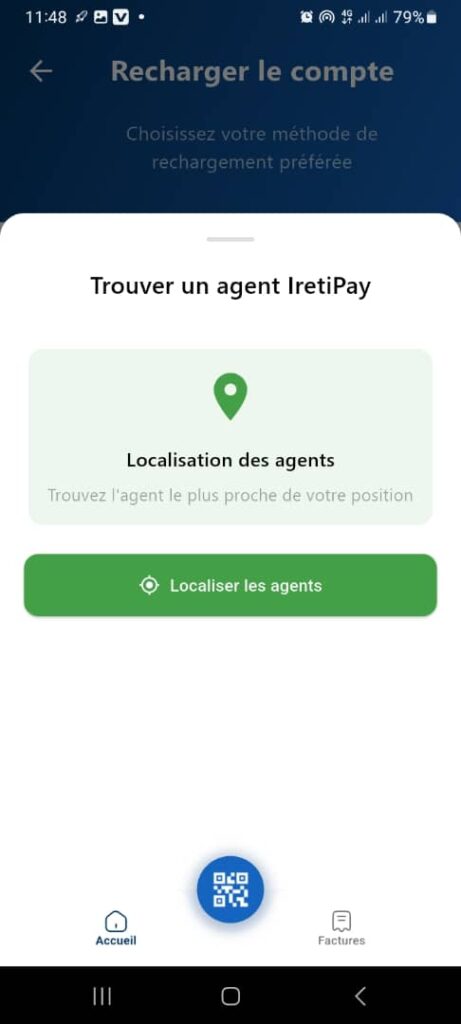
The Find an IretiPay Agent page allows the user to locate a nearby IretiPay agent in order to top up their account with cash.
It facilitates access to physical top‑up locations by relying on geolocation.
2. Access Context
This page is accessible from:
- Home
- Top Up Account
- Cash → IretiPay Agent
It is displayed as a modal window / sliding panel over the previous page.
3. General Page Structure
3.1 Display Type
- Modal panel with rounded corners
- Semi‑transparent background over the underlying page
- Centered content focused on the main action
4. Page Header
4.1 Title
Find an IretiPay Agent
🎯 Clearly indicates the expected action: searching for an agent.
4.2 Visual Indicator
- Small horizontal bar at the top of the panel
- Indicates that the panel can be dragged or closed
5. Information Area – Agent Location
5.1 Informational Card
- Icon: Location pin
- Title: Agent Location
- Description:
Find the agent closest to your location
🎯 Objective:
- Explain the purpose of the feature
- Reassure the user about the expected result (nearest agent)
6. Primary Action Button
6.1 Button: Locate Agents
- Color: Green
- Icon: Target / GPS
- Position: Below the information area
Action:
- Requests permission to access geolocation
- Detects the user’s current location
- Displays a list or map of nearby available IretiPay agents
7. Expected Functional Behavior
7.1 Geolocation
- ✅ Requests GPS permission on first use
- ✅ Uses the user’s current location
- ✅ Searches for agents within a defined radius (e.g., 1 to 5 km)
7.2 Error Cases to Handle
- ❌ GPS disabled
- ❌ Permission denied
- ❌ No agents found nearby
- ❌ Internet connection issue
👉 In these cases, a clear message and a corrective action must be provided.
8. Bottom Navigation Bar
Always visible behind the panel:
- 🏠 Home
- 📷 QR Code (central button)
- 🧾 Bills
📌 Ensures continuity of navigation within the application.
9. UX / UI Rules
- Single, clearly highlighted primary action
- Clear and concise text
- Explicit icons (location)
- Fast interaction to avoid user friction
10. Summary
✅ Page focused on quick agent search
✅ Use of geolocation for a better experience
✅ Simple, intuitive, and guided interface
✅ Key step for cash top‑ups
