
Transfer via IretiPay
1. Page Objective
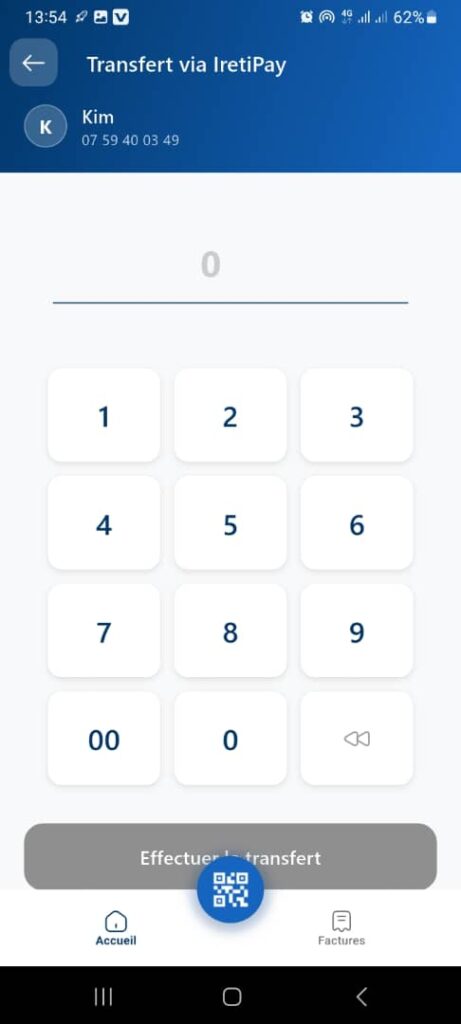
The Transfer via IretiPay page allows the user to:
- enter the amount to transfer
- perform an internal IretiPay transfer
- send money for free and instantly to another IretiPay user
It represents the amount entry step in the transfer process.
2. Access Context
This page is accessible after:
- selecting the beneficiary
- choosing the IretiPay payment method on the Money Transfer page
3. Page Header
3.1 Back Button
- Icon: back arrow
- Function:
- return to the previous step
- change the transfer method or the recipient
3.2 Title
Transfer via IretiPay
🎯 Clearly indicates the selected transfer channel.
3.3 Beneficiary Information
Displayed below the title:
- Avatar / Initial: K
- Name: Kim
- Number: 07 59 40 ..
📌 This information is displayed in read‑only mode to prevent any modification at this stage.
4. Amount Entry Area
4.1 Amount Field
- Type: numeric field
- Initial value: 0
- Currency: CFA francs (implicit)
- Behavior:
- the amount is displayed dynamically while typing
- only numeric values are allowed
🎯 Objective: allow fast and error‑free entry of the transfer amount.
5. Custom Numeric Keypad
5.1 Layout
- Numeric keys: 1 to 9
- Special keys:
- 00: quick entry for hundreds or thousands
- 0: zero
- ⌫ (backspace): delete the last digit
5.2 Features
- Controlled input (no system keyboard)
- Progressive deletion of the amount
- Prevents any non‑numeric input
6. Primary Action Button
- Button: Make the transfer
- Position: bottom of the screen
- State:
- disabled (greyed out) if the amount = 0
- enabled as soon as a valid amount is entered
- Function:
- validates the amount
- moves to the next step:
- summary
- confirmation with PIN / biometrics
⚠️ No transaction is executed at this stage.
7. Bottom Navigation
Visible elements:
- 🏠 Home
- 📷 QR Code (floating central button)
- 🧾 Bills
📌 Navigation remains accessible but may be restricted depending on business rules (process in progress).
8. Expected Functional Behaviors
✅ Smooth and instant amount entry
✅ Blocking of invalid amounts (0 or negative)
✅ Available balance verification at the next step
✅ No fees applied (internal IretiPay transfer)
9. Error Cases to Handle
- Zero or invalid amount
- Insufficient balance
- Network connection issue
- User session expired
👉 Clear messages must be displayed before final confirmation.
10. Security
- The transfer requires final confirmation (PIN, biometrics)
- No execution without explicit validation
- Beneficiary data is locked
11. UX / UI Rules
- Large and readable keypad
- Amount clearly visible and centered
- Clearly identifiable action button
- Simple, distraction‑free flow
12. Summary
✅ Step dedicated to amount entry
✅ Free and instant internal transfer
✅ Secure and intuitive interface
✅ Maximum reduction of input errors
