
Compute workloads for hybrid clouds
⚠️ Warning
This content refers to CentOS, a Linux distribution that has reached EOL (end‑of‑service) status. Review your usage and plan accordingly. For more information, see the CentOS end‑of‑life help guidance.
Tailwind Traders has a variety of compute workloads running as physical servers, virtual machines, or containers in datacenters located in Sydney, Melbourne, and Auckland. These workloads run a combination of Windows Server and Linux, with Hyper‑V configured as the primary virtualization platform.
Managing this diverse group of operating systems is already a challenge for Tailwind Traders. The company is concerned that moving to a hybrid posture—where workloads run both on‑premises and in the cloud—could make it even more difficult to keep track of server operating system workloads and their compliance status.
For the past few years, Tailwind Traders has used a Microsoft high‑performance computing (HPC) package to manage a 16‑node compute cluster. The cluster resides in the Sydney datacenter for a range of engineering‑related design tasks. These computations occur only for short periods throughout the year. But as the calculations become more complicated, the time required for these calculations increases.
Tailwind Traders plans to use containers as the primary platform for new applications instead of hosting them on virtual machines. The company is interested in a platform that allows it to orchestrate containers in its hybrid environment.
In this unit, you will learn different ways to support compute workloads in hybrid environments.
What are Azure Arc‑enabled servers?
Azure Arc‑enabled servers allow organizations to manage Windows and Linux servers on networks outside Azure. This capability includes servers hosted on internal organizational networks and servers hosted on third‑party cloud IaaS infrastructure.
When you connect a computer to Azure using Azure Arc to install the Azure Arc Server agent, the server can be treated as an Azure resource. You can then manage the server as part of a resource group within a subscription. You can also apply Azure Policy for configuration and management and add tags.
The Azure Arc‑based server agent supports the following Windows and Linux operating systems:
- Windows Server 2008 R2 SP1, 2012 R2, 2016, 2019, and 2022
- Both Desktop and Server Core experiences are supported
- Azure editions are supported on Azure Stack HCI
- Windows 10, 11 (see client OS guidance)
- Windows IoT Enterprise
- Azure Stack HCI
- Ubuntu 16.04, 18.04, 20.04, and 22.04 LTS
- Debian 10 and 11
- CentOS Linux 7 and 8
- Rocky Linux 8
- SUSE Linux Enterprise Server (SLES) 12 SP3–SP5 and 15
- Red Hat Enterprise Linux (RHEL) 7, 8, and 9
- Amazon Linux 2
- Oracle Linux 7 and 8
Only x86‑64 (64‑bit) architectures are supported.
The Azure Arc Server agent supports the following features:
- The Azure Policy guest configuration feature allows you to validate the operating system configuration.
- Azure Monitor Log Analytics resource context for data allows you to restrict access to server telemetry by using Azure role‑based access control (RBAC).
The features included when the Azure Arc‑based Server agent is deployed on computers in hybrid environments are evolving. For more information, see Azure Arc‑supported cloud operations and what’s new for Azure Arc‑enabled servers.
For Tailwind Traders, having a single location to manage Windows Server and Linux workloads across the entire hybrid environment addresses some of the operations team’s concerns about the complexity of the hybrid environment.
What is Azure Stack HCI?
Azure Stack HCI is a hyperconverged infrastructure operating system that you can use to host Hyper‑V virtual machines running Windows and Linux operating systems. Unlike running on a Windows Server Hyper‑V hyperconverged cluster, Azure Stack HCI is designed to give you the ability to deploy and manage virtual machines through the Azure portal or Windows Admin Center.
Unlike a traditional Windows Server virtualization deployment, in which the on‑premises operations team retains responsibility for managing the host operating system, Azure Stack HCI is an Azure service. A customer acquires a validated hardware configuration from an approved vendor and connects the system to an Internet‑connected network; then an Azure service manages the infrastructure. Hybrid Azure services such as Azure Automation Update Management, Azure Site Recovery, and Azure Backup are automatically integrated.
For Tailwind Traders, Azure Stack HCI provides a future platform to which the company can eventually migrate its on‑premises virtual machines. The migration enables a consistent set of management tools for all virtual machines in the hybrid environment.
What is hybrid high‑performance computing?
High‑performance computing (HPC) uses a large number of processors or graphics processors to perform complex mathematical tasks, such as certain scientific and engineering calculations. Instead of having these CPUs or GPUs attached to the same computer, HPC uses a layout in which a controlling computer assigns tasks to separate computers. These computers run Windows and Linux operating systems as nodes to perform discrete segments of large, repetitive computation. The more nodes in an HPC cluster, the faster the HPC cluster performs the calculation.
Organizations with an existing on‑premises HPC solution can connect that solution to Azure. This structure allows them to quickly enter the cloud. Expanding to the cloud involves adding cloud‑based HPC nodes to an existing on‑premises HPC node deployment. When you use this approach, HPC compute nodes can be instantiated in Azure as needed to perform compute tasks, and then deleted once the tasks are completed.
The following image shows cloud bursting.
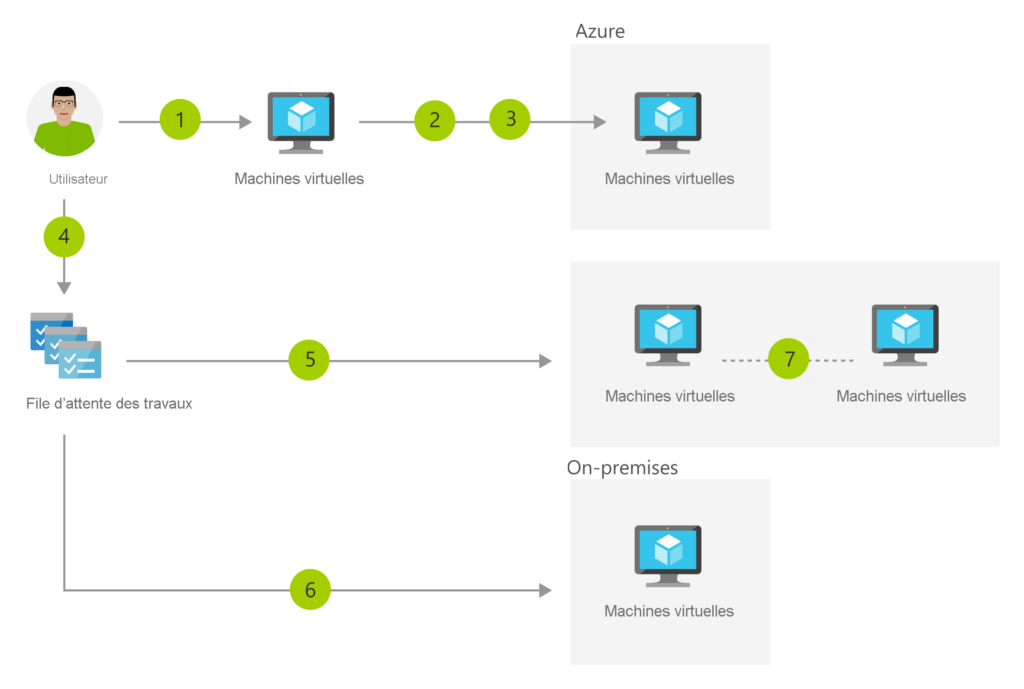
The ability to burst HPC compute resources into the cloud allows organizations to keep a minimal amount of hardware for common on‑premises HPC tasks. Organizations can then deploy additional nodes as needed if the compute benefit justifies the expense.
Tailwind Traders has an HPC deployment. But the company’s ability to perform complex computations is limited by the amount of compute resources in its physical and virtual environments that it can allocate to HPC tasks. If it adopts a hybrid HPC approach, Tailwind Traders can scale its HPC capacity as needed without having to purchase the hardware for additional local nodes.
What is Azure Arc‑enabled Kubernetes?
Azure Arc‑enabled Kubernetes allows you to attach and configure Kubernetes clusters so that they can be managed through the Azure portal. When you use Azure Arc‑enabled Kubernetes, you can:
- Connect Kubernetes clusters running outside Azure and perform inventory, grouping, and tagging tasks.
- Deploy applications and apply configuration to Azure Arc‑enabled Kubernetes clusters using GitOps‑based configuration management.
- Use Azure Monitor to enable containers to examine and monitor your Kubernetes clusters in a hybrid environment.
- Apply Azure Policy for Kubernetes policies to Kubernetes clusters in a hybrid environment.
Azure Arc‑enabled Kubernetes works with any CNCF (Cloud Native Computing Foundation) certified Kubernetes cluster. Azure Arc‑enabled Kubernetes enables your organization to manage Kubernetes clusters both on‑premises and in the cloud in a hybrid environment, as illustrated in the following image.

The advantage for Tailwind Traders of using Azure Arc‑enabled Kubernetes is that it allows the company to manage Kubernetes clusters using a single set of tools. It also allows these Kubernetes clusters to be configured and secured consistently across the hybrid environment.
Introduction to Azure Arc‑enabled data services
Azure Arc‑enabled data services enable organizations to manage supported databases running in Azure and on‑premises using a single set of tools. Organizations can use Azure Arc‑enabled data services to run Azure Database for PostgreSQL and SQL managed instances on‑premises while managing those instances through Azure Data Studio, the Azure portal, or the Azure CLI.
When enabled, Azure Arc‑enabled data services allow you to automate the update and patching processes for these on‑premises database instances. The update and patching processes work in the same way that Microsoft manages these processes when you deploy PostgreSQL and SQL managed instances in Azure. Azure Arc‑enabled data services also allow organizations to apply the advanced threat protection feature available in Microsoft Defender for Cloud for Azure SQL Databases on database server instances running on‑premises.
Azure Arc‑enabled data services use container infrastructure and Kubernetes for on‑premises services. Azure Arc‑enabled data services also allow integration between these on‑premises data services and Azure services such as Azure Backup.
From Tailwind Traders’ perspective, Azure Arc‑enabled data services offer another way to run some of its current database workloads. The company can migrate some of its on‑premises databases to Azure Arc‑enabled data services. This migration should alleviate the operations team’s concerns about the management and security of these instances.
What is Azure Site Recovery?
Azure Site Recovery enables organizations to replace disaster recovery sites by replicating physical and virtual operating systems, as well as the workloads they host, to the Azure cloud platform. Azure Site Recovery allows failover to Azure. Azure Site Recovery can also fail back workloads to an on‑premises datacenter from Azure.
The following image shows a basic Azure Site Recovery configuration.

Azure Site Recovery allows Tailwind Traders to move from using the Melbourne and Sydney datacenters as disaster recovery sites to an on‑premises‑only implementation. Now, they can use Azure as a disaster recovery site for a large number of workloads, as the deployment becomes hybrid. The challenge for Tailwind Traders is that some workloads have physical or other dependencies that prevent them from being migrated to Azure. The company is unable to use Azure as a disaster recovery site for these workloads for the same reasons.
