
How Declarative Agents Work
Now that we know the basics of a declarative agent, let’s see how it works behind the scenes. You’ll discover all the components of declarative agents and see how they come together to create an agent. This knowledge helps you decide whether a declarative agent is right for you.
Custom Knowledge
Declarative agents use custom knowledge to provide additional data and context to Microsoft 365 Copilot, targeted to a specific scenario or task.
Custom knowledge consists of two parts:
- Custom instructions: define how the agent should behave and shape its responses.
- Custom grounding: defines the data sources the agent can use in its responses.
What are custom instructions?
Instructions are specific guidelines or directives given to the base model to shape its responses. These instructions may include:
- Task definitions: describing what the model should do, such as answering questions, summarizing text, or generating creative content.
- Behavioral guidelines: defining the tone, style, and level of detail in responses to match user expectations.
- Content restrictions: specifying what the model should avoid, such as sensitive topics or copyrighted content.
- Formatting rules: indicating how the output should be structured, for example using bullet points or specific formatting styles.
Example: In our IT support scenario, our agent receives the following instructions:
You are IT support, an intelligent assistant designed to answer common questions from Contoso Electronics employees and manage support tickets. You can use the Tickets action and documents from the IT helpdesk SharePoint Online site as information sources. When you cannot find the necessary information, prioritize documents from the helpdesk site over your own training knowledge and ensure your responses are not specific to Contoso Electronics. Always include a cited source in your responses. Your responses should be concise and suitable for a non-technical audience.
What is custom grounding?
Grounding is the process of connecting large language models (LLMs) to real-world information, enabling more accurate and relevant responses. Grounding data is used to provide context and support to the LLM when generating responses. This reduces the need for the LLM to rely solely on its training data and improves response quality.
By default, a declarative agent is not connected to any data source. You configure a declarative agent with one or more Microsoft 365 data sources:
- Documents stored in OneDrive
- Documents stored in SharePoint Online
- Content ingested into Microsoft 365 via a Copilot connector
Additionally, a declarative agent can be configured to use web search results from Bing.com.
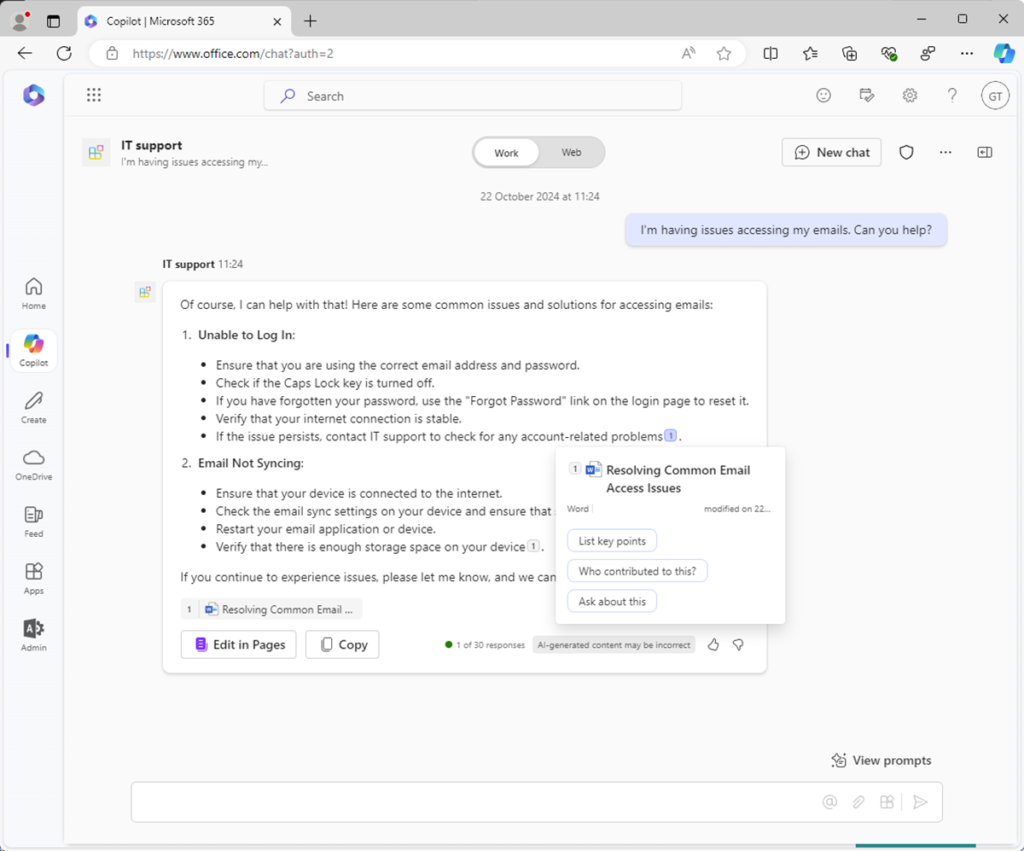
Example: In our IT support scenario, a SharePoint Online document library is used as the grounding data source.
When Copilot uses grounding data in a response, the data source is referenced and cited in the response.
Custom Actions
Custom actions allow declarative agents to interact with external systems in real time.
You create custom actions and integrate them into the declarative agent to read and update data in external systems using APIs.
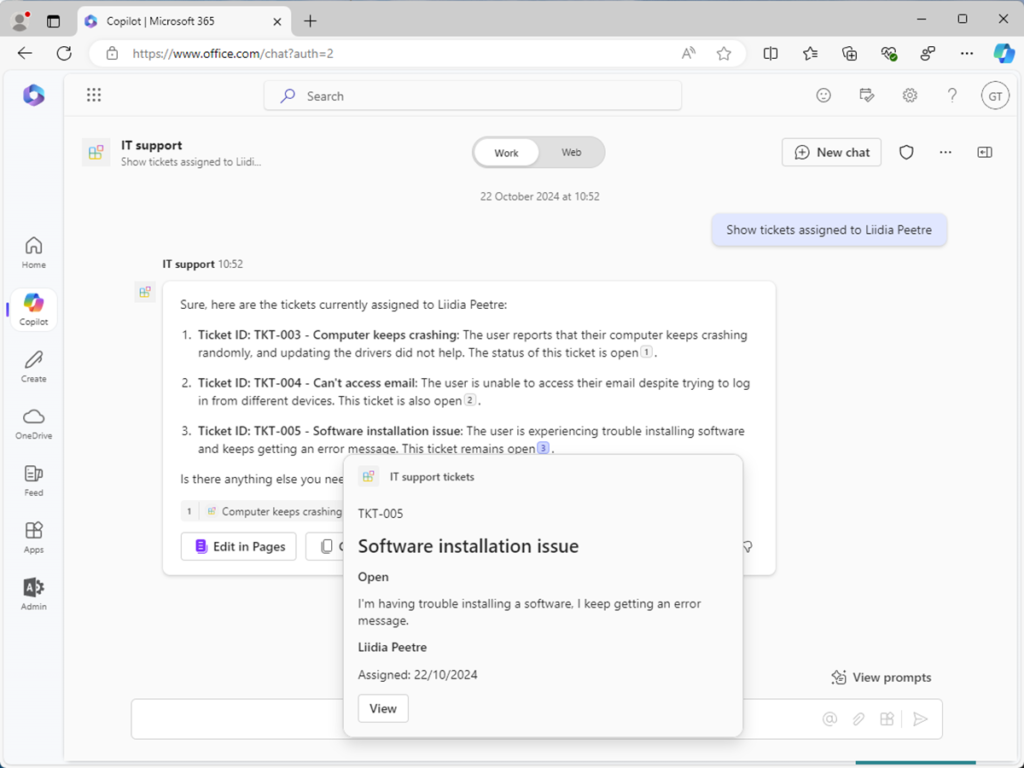
Example: In our IT support scenario, a custom action is used to read and write data in the support ticket management system via an API.
How does a declarative agent use custom knowledge and custom actions to answer questions?
Let’s see how custom knowledge and custom actions are used together in a declarative agent to solve our IT support problem.
You build a declarative agent with the following configuration:
- Custom instructions: Use instructions to shape responses so they are suitable for non-technical users.
- Custom grounding data: Use grounding data to improve the relevance and accuracy of responses. For example, use information stored in knowledge base articles on a SharePoint Online site.
- Custom action: Use actions to access real-time data from external systems. For example, use an action to interact with data from the support ticket management system via its API to manage tickets in natural language.
The following steps describe how Microsoft 365 Copilot processes user prompts and generates a response:
- Input: The user submits a prompt.
- Pre-checks: Copilot performs responsible AI checks and security measures to ensure the user prompt poses no risk.
- Reasoning: Copilot builds a plan to respond to the user prompt.
- Grounding data: Copilot retrieves relevant information from the grounding data.
- Actions: Copilot retrieves data from relevant actions.
- Instructions: Copilot retrieves the declarative agent’s instructions.
- Response: The Copilot orchestrator compiles all data gathered during the reasoning process and sends it to the LLM to generate a final response.
- Output: Copilot delivers the response to the user interface and updates the conversation.
