When to Use Declarative Agents
Here, we discuss how you can decide whether a declarative agent is the right choice to customize Microsoft 365 Copilot. We list some criteria that indicate whether declarative agents meet your goals.
Decision Criteria
Declarative agents help you extend Microsoft 365 Copilot with agents tailored to specific scenarios, without heavy coding.
Cases where declarative agents might not be the best choice generally involve the need for deeper customization and flexibility offered by the platform.
| Factor | Description |
|---|---|
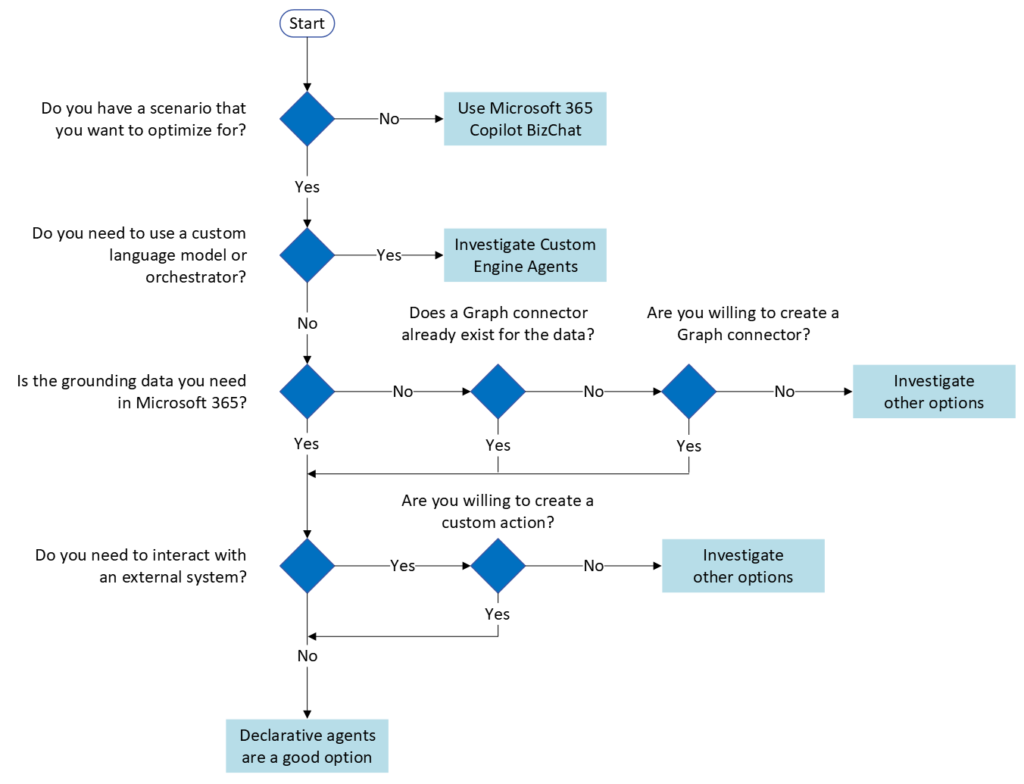
| Scenario | The key question to ask when considering declarative agents is: “Do I have a specific topic or task I want to optimize?” Declarative agents work well when you know the scenario you want to optimize. |
| Orchestrator and Model | Declarative agents use the same orchestrator and model as Microsoft 365 Copilot. Reusing existing infrastructure and controls provides a consistent experience for end users. If you need a custom orchestrator and/or the use of another large language model, then a declarative agent is not an option; you should consider building a custom engine agent instead. |
| Data Sources | The next consideration is data sources. Declarative agents work well when the relevant information for your scenario is available in Microsoft 365. If you need to ingest data into Microsoft 365 from an external system, you can use a Copilot connector. If you need to interact with external systems in real time, you can use a custom action. |
Applying the Criteria
Declarative agents work best when you want to reuse the same orchestrator and base model as Microsoft 365 Copilot.
Our fictional IT support team needed a way for employees to find answers to common IT support questions and create support tickets if they couldn’t find the necessary answers.
Our goal was to decide whether this scenario was suitable for a declarative agent. To make our decision, we need to analyze each task using the four criteria we developed: scenario, orchestrator and model, and data sources.
- Do we know the scenario we want to optimize? Yes. Self-service for employee IT support.
- Do we need a custom orchestrator and model? No. The orchestrator and model from Microsoft 365 Copilot can summarize and transform information from documents.
- Do we know the authorized data sources? Yes. We know that the knowledge base articles are stored as PDFs in SharePoint Online. Although the support ticket system data is not stored in Microsoft 365, we can create a custom action to interact with that system.
A declarative agent is a good choice for our fictional IT support team.
A declarative agent is a good option if we know: the scenario we are optimizing, that the orchestrator and model provided by Microsoft 365 Copilot are suitable for the task, and that the grounding data is already in Microsoft 365.
Recommendation Summary
The following flowchart summarizes the key questions to ask when considering the use of declarative agents.