
Hybrid cloud applications
Tailwind Traders has several applications that include front‑end components running locally in a perimeter network. The back‑end elements are located on a protected internal network. One of Tailwind Traders’ goals for moving to a hybrid cloud is to decommission its perimeter network and host all public workloads in the cloud. Due to compliance issues and concerns from workload owners, some of these applications must physically remain in Tailwind Traders’ facilities instead of being hosted in an Azure datacenter.
Tailwind Traders has other applications that can be accessed through VPN connections in the protected internal networks in the Sydney, Melbourne, and Auckland datacenters. These applications typically require users to authenticate to their on‑premises Active Directory.
In this unit, you will learn about hybrid connection technologies. These connections allow Tailwind Traders to manage applications so that users connect through Azure, even when the data or the application itself is hosted on Tailwind Traders hardware.
What is Azure Relay?
Azure Relay is a service that you can use to securely expose workloads that run on your organization’s internal network to the public cloud. The service securely exposes these workloads without opening an inbound port on the perimeter network firewall.
Azure Relay supports the following scenarios between on‑premises services and applications that run in Azure:
- Standard one‑way, request/response, and peer‑to‑peer communication
- Event distribution to enable publish/subscribe scenarios
- Two‑way, unbuffered communication between sockets across network boundaries
Azure Relay offers the following features:
- Hybrid Connections: This feature uses standard open WebSockets and can be used in cross‑platform architectures. It supports .NET Core, .NET Framework, JavaScript/Node.js, open‑standards‑based protocols, and Remote Procedure Call (RPC) programming models.
- WCF Relay: This feature uses Windows Communication Foundation (WCF) to enable remote procedure calls. This is an option many customers use with their WCF programs. It also supports the .NET Framework.
Azure Relay allows Tailwind Traders to publish applications running on the internal network to clients on the internet without requiring a VPN connection. The company should use Azure Relay instead of Azure App Service Hybrid Connections when there is no front‑end web app running in Azure. Azure Relay should be used instead of Microsoft Entra Application Proxy when the application does not require Microsoft Entra authentication.
What are Azure App Service Hybrid Connections?
The Hybrid Connections feature in Azure App Service can use any application resource on any network that can send outbound requests to Azure on port 443.
For example, you can use Hybrid Connections to allow a web application running in Azure to use a SQL Server database running on‑premises.
Hybrid Connections provide access from an application running in Azure to a TCP endpoint.
Hybrid Connections are not limited to workloads running on Windows Server platforms. You can configure Hybrid Connections to access any resource that functions as a TCP endpoint, regardless of the application protocol used. For example, you can set up a Hybrid Connection between a web application running in Azure and a MySQL database running on an on‑premises Linux VM.
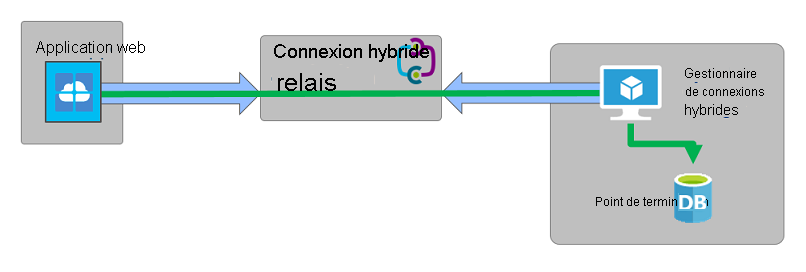
Hybrid Connections use a Relay agent. You deploy the Relay agent in a location where it can establish connectivity to the TCP endpoint on the internal network and establish a connection to Azure.
This connection is secured through the TLS 1.2 protocol.
Shared Access Signature (SAS) keys are used for authentication and authorization.
The following image shows a hybrid connection between a web application running in Azure and an on‑premises database endpoint.
Hybrid Connections Features
The features of hybrid connections include:
- Applications that run in Azure can securely access on‑premises systems and services.
- On‑premises systems or services do not need to be directly accessible to hosts over the Internet.
- There is no need to open a port in the firewall to allow inbound access from Azure to the Relay agent. All communications are initiated outbound from the Relay agent through port 443.
The limitations of hybrid connections are as follows:
- They cannot be used to mount an SMB share on a local network.
- They cannot use the User Datagram Protocol (UDP).
- They cannot access TCP services that use dynamic ports.
- They do not support the Lightweight Directory Access Protocol (LDAP) because of the dependency on the UDP protocol.
- They cannot be used to perform an Active Directory Domain Services domain join operation.
For Tailwind Traders, hybrid connections enable the retirement of several applications whose front‑ends currently run on the Tailwind Traders perimeter network. These applications can migrate to Azure. Hybrid connections can then provide a secure connection to the protected networks that host the application’s core components.
What is Microsoft Entra Application Proxy?
A Microsoft Entra application proxy allows you to provide secure remote access to a web application that runs in an on‑premises environment through an external URL. You can configure an application proxy to allow remote access and single sign‑on to SharePoint, Microsoft Teams, IIS web apps, and Remote Desktop. The application proxy can be implemented as a replacement for VPNs for internal networks or reverse proxies.
The application proxy works with the following applications:
- Web applications that use Integrated Windows Authentication.
- Web applications that use header‑based or form‑based authentication.
- Applications hosted through the Remote Desktop Services gateway.
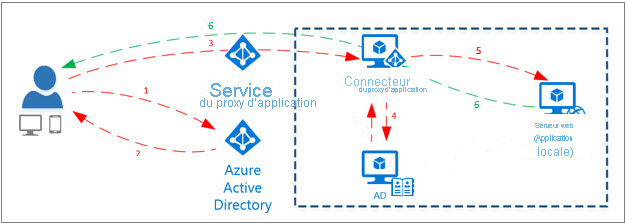
The application proxy works as follows:
- The user signs into the app through a publicly available endpoint and then performs Microsoft Entra authentication.
- A token is passed to the user’s device after sign‑in is complete.
- The client device forwards the token to the Application Proxy service, which returns the User Principal Name (UPN) and the Service Principal Name (SPN) from the token. The Application Proxy service then forwards the request to the Application Proxy connector.
- The Application Proxy connector performs additional authentication if SSO is enabled.
- The Application Proxy connector forwards the request to the on‑premises application.
- The response is sent through the connector and the Application Proxy service back to the user.
The following image illustrates this process:
Users on internal networks that allow direct connection to applications should avoid using Application Proxy.
Tailwind Traders can use the Microsoft Entra Application Proxy to provide external users with access to internal applications that use Active Directory authentication.
