
Hybrid identity
Tailwind Traders has been using Active Directory Domain Services (AD DS) as its on‑premises identity provider in its local network environment since its migration from Windows NT 4.0 in the early 2000s. Many existing Tailwind Traders applications have a dependency on Active Directory. Some of these applications have a simple dependency on Active Directory as an identity provider. Others have deeper dependencies, such as complex Group Policy requirements, custom domain partitions, and custom schema extensions.
As Tailwind Traders begins to move some resources and develop new applications in Azure, the company wants to avoid building a parallel identity solution. It does not want to require separate login information for on‑premises and cloud resources.
In this unit, you will learn about the different ways to implement hybrid identity.
Deploy domain controllers on Azure
The simplest way to provide in Azure the same AD DS environment that the organization uses on‑premises is to perform the following steps:
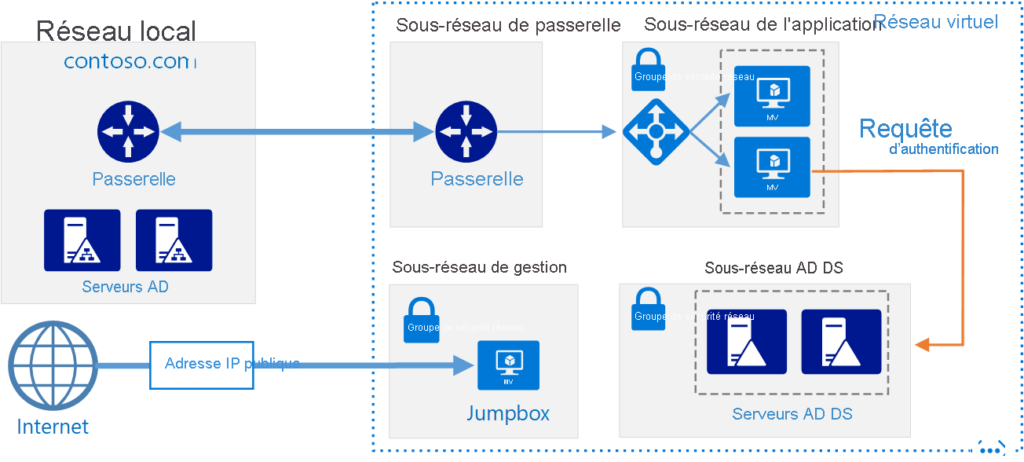
- Deploy a pair of AD DS domain controllers on a subnet of an Azure virtual network.
- Connect this virtual network to the on‑premises network.
- Configure this subnet as a new AD DS site, as shown in the following image.

Another option is to configure the cloud‑hosted AD DS domain as the child domain of the local domain’s forest. Another option is to configure AD DS domain controllers running in the cloud as a separate forest that has a trust relationship with the local forest. The following image shows the topology of this resource forest.
Organizations that deploy domain controllers on virtual machines in Azure can then deploy workloads that require direct line‑of‑sight to a domain controller. They can deploy them as long as the workloads are on the same subnet of the Azure virtual network where their domain controller VMs are deployed. This hybrid cloud model is conceptually simple for many organizations, because Azure datacenters are treated as a remote Active Directory site.
For Tailwind Traders, extending its on‑premises Active Directory domain or on‑premises Active Directory forest into Azure may be sufficient depending on the application requirements. The disadvantage of deploying this option is that virtual machines that run all the time, such as domain controllers, incur ongoing costs.
What is Microsoft Entra Connect?
Microsoft Entra Connect (formerly Azure AD Connect) allows organizations to synchronize identities in their on‑premises Active Directory with Microsoft Entra ID (formerly Azure AD). This method allows you to use the same identity for cloud resources and on‑premises resources. Microsoft Entra Connect is most commonly used when organizations adopt Microsoft 365. They use it to allow applications such as Microsoft SharePoint and Exchange running in the cloud to be accessed through on‑premises applications.
If Tailwind Traders plans to adopt Microsoft 365 technologies such as Exchange Online or Microsoft Teams, it must configure Microsoft Entra Connect to replicate identities from its on‑premises AD DS environment to Azure. If the company also wants to use on‑premises identities with applications in Azure, but does not want to deploy AD DS domain controllers on virtual machines, it must also deploy Microsoft Entra Connect.
Introduction to Microsoft Entra Domain Services
You can use Microsoft Entra Domain Services to project a Microsoft Entra domain onto an Azure virtual subnet. When you use this configuration, services such as domain join, Group Policy, Lightweight Directory Access Protocol (LDAP), and Kerberos and NTLM authentication are available to any VM deployed on the subnet.
Microsoft Entra Domain Services allows you to have a basic managed Active Directory environment on virtual machines without having to worry about managing, maintaining, or paying for virtual machines that run as domain controllers. Microsoft Entra Domain Services also allows you to use on‑premises identities through Microsoft Entra Connect to interact with VMs running on a specially configured Azure virtual network subnet.
The disadvantage of Microsoft Entra Domain Services is that the implementation of Group Policy is basic. It includes a fixed set of policies and does not provide any ability to create Group Policy Objects (GPOs). Even though identities used on‑premises are available in Azure, not all policies configured on‑premises are available.
For Tailwind Traders, Microsoft Entra Domain Services offers a good alternative for hybrid workloads. The service allows the use of a domain‑joined identity and a significant amount of Group Policy configuration. But it does not support applications that require complex Active Directory features such as custom domain partitions and schema extensions.
