
What is Azure VMware Solution?
Every company is at a different stage of its digital transformation journey and its use of the cloud. In partnership with VMware, Microsoft created Azure VMware Solution. It is a service that enables organizations to move enterprise VMware‑based workloads from an on‑premises environment to Azure, allowing them to deploy new virtual machines (VMs) and directly connect workloads to other Azure services.
Azure VMware Solution combines VMware’s Software‑Defined Data Center (SDDC) software with the global Azure cloud service. It is a VMware‑validated solution, with ongoing certifications as well as testing of improvements and upgrades.
Microsoft manages Azure VMware Solution to meet performance, availability, security, and compliance requirements. Microsoft provides the following components to run Azure VMware Solution at scale in Azure:
- Management systems
- Network services
- Operating platform
- Back‑end infrastructure operations
VMware vSphere clusters are built on dedicated Azure hardware. These clusters are deployed and managed through the Azure portal, the Azure CLI, or PowerShell. All provisioned private clouds use the supported standard versions of VMware vCenter Server, vSAN, vSphere, and NSX when you bring your portable VCF subscription to Azure VMware Solution. If you choose this service for your business, you can benefit from elasticity through the ability to add and remove resources (compute, network, and storage) on demand.
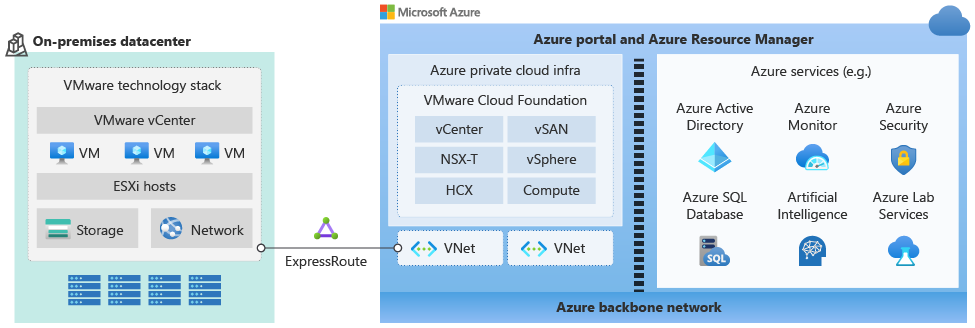
The following diagram illustrates the relationship between private clouds and networks in Azure, Azure services, and on‑premises environments.
Key Characteristics
Azure VMware Solution provides a full VMware environment in Azure. It enables your organization to:
Use existing VMware investments
There is no need to retrain teams or learn new tools, because the underlying products are standard VMware vSphere and vCenter products.
You can manage your VMware environments without having to retrain staff or refactor the underlying hypervisors.
Create operational consistency for administrators
Operational consistency is created for administrators because you continue to use VMware solutions for resources running on Azure, including vSphere Client and NSX Manager.
Administrators have direct access to VMware interfaces. The Azure portal is used only for deployment and management operations.
Maintain operational consistency for the business
The service can reduce change management and maintain operational consistency for the business.
You can use all your organization’s existing investments in:
- Training
- Process management
- Change management
- Tools
You can accelerate migration and minimize downtime by using the latest enterprise features of VMware Hybrid Cloud Extension (HCX) for large‑scale live migrations from an on‑premises environment to Azure.
Have a single support point
Azure VMware Solution is developed, operated, and supported by Microsoft.
Microsoft is the first and single point of contact for AVS and VCF, and coordinates support with VMware if necessary.
Leverage your existing VCF licenses
You work with a single provider for licensing and resource consumption.
Bring your portable VCF subscription into Azure VMware Solution, and Microsoft installs, manages, and updates the VMware technology stack.
Maximize the value of existing Windows Server and SQL Server licenses
You can use Azure Hybrid Benefit for Windows Server and SQL Server to bring your existing licenses to Azure and reduce costs.
Integration with native Azure services
Azure VMware Solution offers customers options to migrate their VMware vSphere environment to the cloud at their own pace.
Administrators use a single Azure portal interface without connecting to a third‑party service.
They gradually build cloud skills as they become familiar with Azure.
Native Azure tools and services, such as the following, allow you to monitor and manage virtual machines in the Azure environment.
You can use these same tools and services to monitor and manage virtual machines in Azure VMware Solution and on‑premises virtual machines.
