
Generative AI
As AI technology advances, it offers organizations multiple opportunities to improve productivity and guide employees. One way to achieve this is through generative AI. Microsoft Copilot Studio allows you to use generative responses in several ways. Once in Copilot Studio, generative AI features are accessible by selecting Generative AI in the Settings menu.
With Copilot Studio, you can use generative AI capabilities to:
- Use generative responses as a fallback: Allows you to use generative responses when an agent cannot find a relevant answer to the user’s question.
- Insert generative responses into topics: Enables you to integrate generative AI into your topics using the generative response node.
- Use Copilot to create agents and topics: Copilot lets you provide a brief description of the agent or topic you want to create, and it builds it for you.
Use generative responses as a fallback
Previously, if an agent could not determine a user’s intent, it asked them to rephrase their question. If the agent failed to identify a topic after two attempts, it escalated to a human agent.
With generative responses, Microsoft Copilot Studio enables your agent to find and present information from multiple sources, internal or external, without creating topics. This allows you to use generative responses as primary sources of information or as a fallback when created topics cannot answer a user’s question. The result: it significantly reduces the time needed to create and deploy a functional agent by eliminating the need to manually write multiple topics that might not cover all customer questions.
All agents include a Conversational Boost topic. This topic runs when your agent cannot identify a topic that answers the user’s question.
The first thing to identify when using generative AI is the knowledge sources used to feed your responses. You can define the knowledge sources you want to use in the Knowledge tab.
As of the publication date of this course, the following knowledge sources are available:
External resources:
- Public websites: Connect to public sites as a source of real-time answers.
- Files: Upload various files as knowledge sources. The content of uploaded files is searched for results.
- SharePoint: Connect your organization’s SharePoint site as a knowledge source.
- Dataverse (preview): Connect to your organization’s Microsoft Dataverse instance as a knowledge source.
IMPORTANT
Additional enterprise data sources, such as Azure SQL, Salesforce, ServiceNow, and many others, are currently in preview.
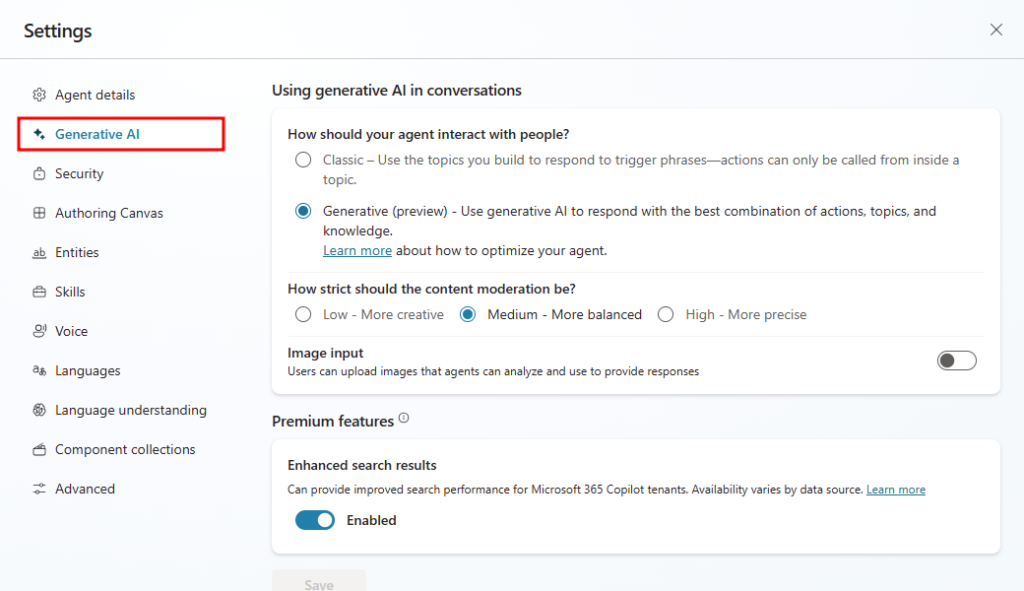
The Generative AI page in Copilot Studio allows you to tailor your agent’s generative capabilities. It offers different options to configure generative AI in your agent. You can access the generative AI configuration page by going to Settings > Generative AI.
On the generative AI settings page, you can define the following:
- How your agent interacts with people: This defines how you want responses to be generated for people interacting with your agent. You can choose from:
- Classic: Uses the topics you create to respond to trigger phrases. Actions can only be called within a topic.
- Generative (preview): Uses generative AI to answer user questions with the best combination of actions, topics, and defined knowledge.
- Content moderation strictness level: Specifies the desired relevance level for generated responses. Available options:
- Low – More creative: Responses come from a broader range of sources and may not be the most relevant.
- Medium – More balanced: Responses come from a narrower, more relevant set of data.
- High – More precise: Provides the most relevant and accurate responses. This option also increases the likelihood that no relevant answer will be found.
- Image input: Allows users to upload images for the agent to analyze.
- Enhanced search results: Offers improved search performance for Microsoft 365 Copilot tenants.
To learn more about generative responses, see: Generative responses as a fallback.
To learn more about content moderation, see: Content moderation.
