Version 2 of the IretiPay application
Top Up Account
Location
Home Page > Top-up icon
Objective
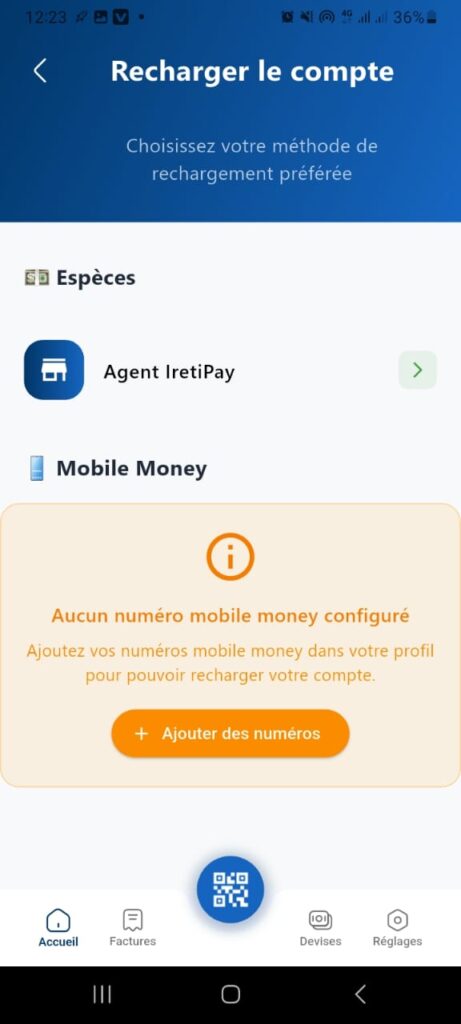
This page allows the user to choose a method to top up their account in the application.
Visible Elements
1. Title and Subtitle
- Title: Top Up Account
- Subtitle: Choose your preferred top-up method
2. Top-up Options
- Cash
- Icon: banknote
- Implicit description: Top-up via cash payment at an agent.
- IretiPay Agent
- Icon: shop/agent
- Green arrow on the right: indicates navigation to a dedicated page to top up via an agent.
- Mobile Money
- Icon: mobile phone
- Warning message: No mobile money number configured
Add your mobile money numbers in your profile to be able to top up your account. - Button: + Add Numbers (orange)
- Action: Redirects to the page for configuring Mobile Money numbers.
3. Navigation Bar (bottom)
- Home (house icon)
- Bills (document icon)
- Currencies (currency icon)
- Settings (gear icon)
- Central floating button: QR Code (likely for scanning to make payments or top-ups).
Expected Behavior
- Selecting a method:
- If the user clicks on Cash or IretiPay Agent, they are redirected to a page to complete the top-up.
- If the user clicks on Mobile Money without having configured a number, they see the warning message and must click Add Numbers to configure their profile.
- Add Numbers button:
- Opens a page to manage Mobile Money numbers in the user profile.
Error Cases
- If no Mobile Money number is configured, top-up via Mobile Money is impossible.
- The user must add a number before continuing.
Target Audience
Users who want to top up their account using different methods (cash, agent, Mobile Money).